Civilization Chronicles
Three AI visual tools, from stickers to video cutouts
Remember Pixel Studio, Designify and Unscreen through stickers, product-photo layouts and video-background removal.
A phone photo could become a sticker. A product picture could be placed into several ready-made layouts. A moving clip could lose its background.
Pixel Studio, Designify and Unscreen put different visual tasks behind simple controls. Their histories are easier to remember through those inputs and outputs than through a generic promise to “make images with AI.”
Pixel Studio: turn an idea or a photograph into a sticker
Pixel Studio brought image generation into a phone app. Google’s 2024 introduction described typing a prompt, changing the image style and editing the result. A later demonstration showed another route: select an object in an uploaded photograph, turn it into a sticker, and use it in another image or message.
A Google contributor described arranging furniture in a room photograph and using a generated room mock-up as a canvas for stickers made from photographed objects. These were the contributor’s examples, not experiments performed by We Used This. The app combined an on-device diffusion model with cloud image generation; it was more than a gallery of finished pictures.
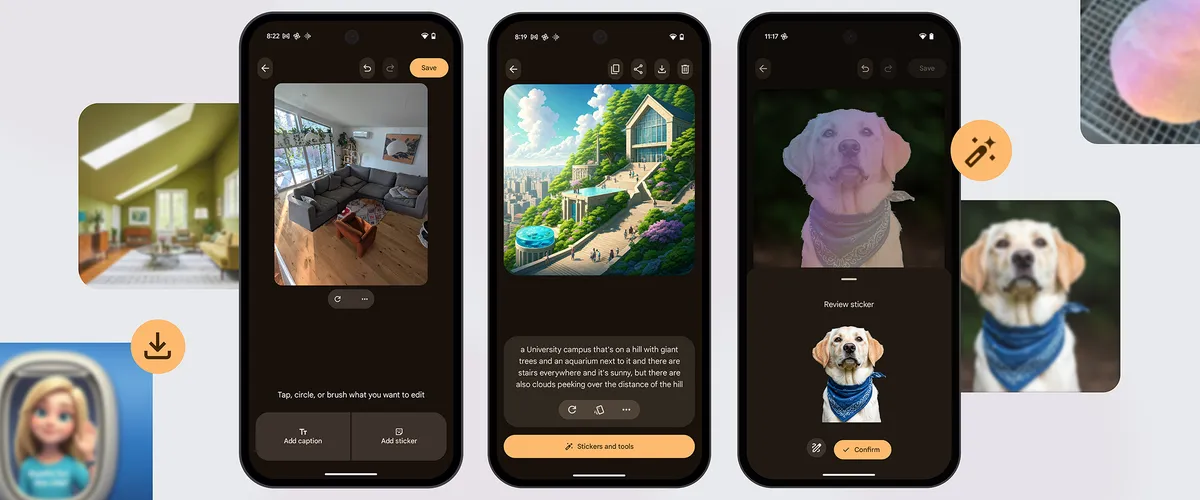
Google says image creation and project editing in Pixel Studio are no longer available. Existing projects can still be viewed and downloaded. The exact final cutoff is not established; the closure update began rolling out in June 2026. The standalone app is distinct from continuing Gemini and Photos features.
Pixel Studio archive · Google’s 2025 product examples · Current Pixel Studio help
Designify: one image, a selection of designs
Designify started with an uploaded photograph and returned a choice of designs. Its operator’s 2021 introduction described automatic background removal, color enhancement and template-based compositions. A user could pick a design and apply the editing approach to additional photos.
For someone making a set of product images, the memorable interaction was the gallery: the same subject could appear in several backgrounds and layouts, with the user choosing a direction before downloading the result. The launch article described batch processing up to ten images at that point; that historical limit should not be read as a current product offer.
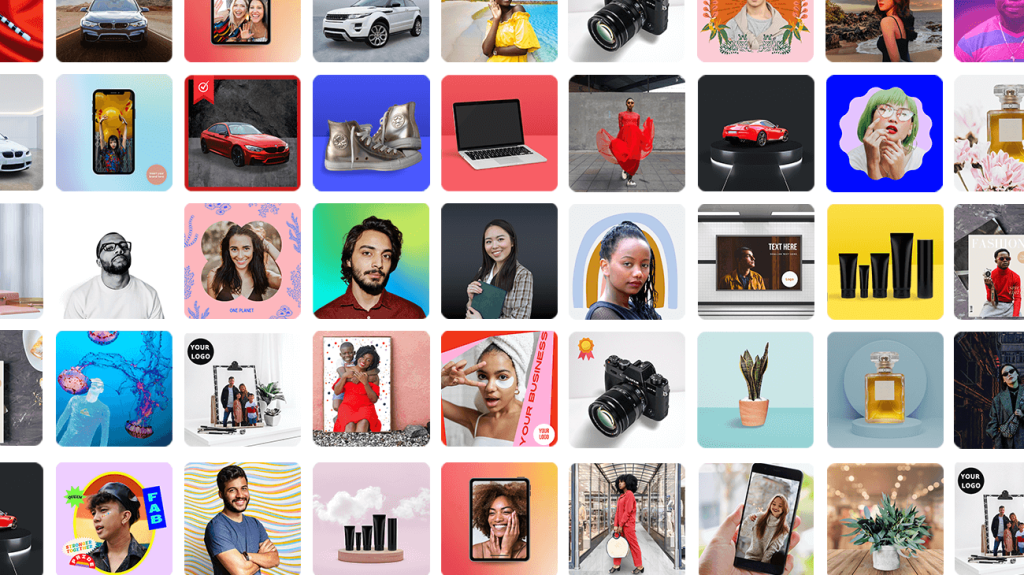
Kaleido later said Designify was sunset on December 1, 2025. Its continuing remove.bg service is a separate product.
Designify archive · Original Designify introduction · Kaleido account notice
Unscreen: take the background out of a moving clip
Unscreen applied a related idea to video. In a 2020 account, TechCrunch described dragging a clip onto the webpage and receiving a version with the foreground person or object separated from the background. The task was not a generated picture from a prompt; it was removing a background from footage a user already had.
That input-output shape made Unscreen different from the still-photo template gallery above. A moving subject had to remain the useful part across frames. The reporting describes the service and its intended workflow, not a promise that every edge or video would be extracted perfectly.
Kaleido’s account help says Unscreen was sunset on December 1, 2025. A later Canva help page says that Unscreen.com was closed as of June 29, 2026. The latter establishes it was closed by that date; it does not itself establish that June 29 was the cutoff. Canva’s continuing video background remover is separate.
Unscreen archive · 2020 product reporting · Kaleido account notice · Canva’s later closure notice
Three different starting points
The tools worked with different materials: an idea or photograph, a set of still images, and a moving clip. Their interfaces show three choices about where automation begins and where the person making something still chooses the result.